






Most Android handsets come loaded with a proper audio toolkit — Fast Pair, high-res codecs, and custom sound profiles. Yet if you jump on any Aussie retailer site or wander through a JB Hi-Fi aisle, you’ll still see stacks of earbuds that feel like they were built for a different ecosystem. The result is the same old headache: laggy connections and dodgy apps that crash the second you try to tweak the EQ.
Tracking down the best earbuds for android shouldn’t be a gamble. It’s about finding wireless earbuds for android that genuinely play nice with your phone’s software — without paying silly money. We’ve looked across the price spectrum and picked out five good earbuds for android that actually deliver, plus a few that are only just “fine”.
Part 1. Why good earbuds for android make a real difference
True compatibility is more than a basic Bluetooth handshake. Android phones handle audio in their own way, with specific codecs and features that only shine when the hardware is tuned for the platform. Get it wrong and it’s not just mildly annoying — you’ll deal with jittery video calls, frustrating gaming lag, and sound that never quite reaches its potential.
1. Fast Pairing and codec basics
Google Fast Pair cuts out the button-holding ritual. With compatible earbuds, a prompt pops up as soon as you open the case, and you’re connected in seconds. AAC is the everyday standard on most phones, but if your handset supports it, aptX or LDAC can deliver higher-fidelity listening. Cheaper best wireless earbuds for android contenders often fall back on SBC, which can flatten the detail and make music sound a bit lifeless.
2. App features that actually matter
The best android earbuds come with companion apps that do more than just exist. You want to adjust EQ curves, toggle noise cancellation, and push firmware updates without the app falling over. Real-time battery tracking and custom button remapping are essentials, not “nice-to-haves”. The best earbud headphones for android shouldn’t be held back by flaky software that crashes every time you skip a track.
3. The price-to-feature sweet spot (and the 200 AUD reality check)
A bigger price tag doesn’t automatically mean better Android integration. The best earbud headphones for android are the ones that balance hard cash against features you’ll genuinely use. In Australia, there are plenty of great picks around the 200 AUD mark that still offer rock-solid connectivity and genuinely good sound. Once you push well beyond that, you’re often paying more for branding and buzz than meaningful performance gains.

Part 2. 5 Great-Value Picks: wireless earbuds for android
Finding the best wireless earbuds for android comes down to what you actually do day to day. These five options cover different priorities while still delivering strong Android-friendly features.
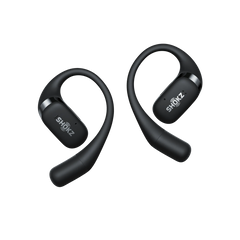
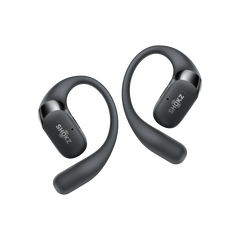
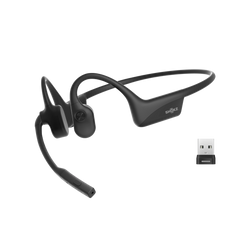
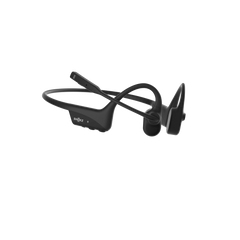
Pick 1: Best value for most Android users — Shokz OpenFit Pro
The OpenFit Pro is a clever bit of kit that blends an open-ear style with unexpectedly punchy sound. Instead of blocking your ear canal, these sit just outside it, letting ambient sound through naturally. That makes them brilliant for busy commutes (think packed Sydney trains), walking near traffic, or staying approachable in a shared office.
Shokz tackled the “thin” reputation of open-ear audio with SuperBoost™. Pair that with Dolby Atmos and you get richer detail across the spectrum, rather than the tinny output you’ll hear on some cheaper designs.
Android-specific highlights:
- Bluetooth 6.1: Holds a rock-solid connection even in crowded places like stations and shopping centres.
- AI-powered mics: Six microphones automatically cut wind and background chatter for clearer calls.
- Massive battery: 12 hours per charge, plus an extra 50 hours in the case.
- Dual charging: USB-C and Qi wireless charging for convenience.
- App customisation: The Shokz app includes five EQ presets and two custom slots.
- Multipoint pairing: Switch between your Android phone and a laptop without drama.
Physical buttons help avoid accidental taps, and IP55 water resistance handles sweat and light rain. At just 12.3g per bud, they stay comfortable for long listening sessions. If you want earbuds that keep you aware of your surroundings without sacrificing sound, these are a standout among good earbuds for android.
Pick 2: Best value for clear calls — OnePlus Buds 4
Designed for seamless Android integration, with fast pairing and reliable connections. Call quality is the focus: noise reduction cuts background noise by up to 49dB, so your voice stays clear in windy street corners or noisy cafés. A dual-driver setup balances punchy bass with crisp highs.
- Fast Pair works instantly with Android 6.0+ devices
- 12.5mm bass driver + separate tweeter helps avoid muddy sound
- 43 hours total (10 hours per charge, plus 33 more with the case)
- Golden Sound mode tuned for OnePlus devices
- IP55 rating for day-to-day weather and gym sessions
A top pick if you’re constantly taking calls while moving. For podcasts and audiobooks, they perform well above the price.
Pick 3: Best value for noise cancelling — Anker Soundcore P40i
Impressive active noise cancelling at a fraction of what big-name brands charge. Adaptive ANC adjusts strength automatically — heavier on public transport, lighter in quieter offices. Six mics handle ANC and calls, and the Soundcore app includes a hearing test to personalise EQ.
- Adaptive noise cancelling up to 40dB reduction
- LDAC support for high-res audio on compatible devices
- 60 hours total (12 hours per charge, plus 48 from the case)
- Multiple ear tip sizes to reduce fatigue
Ideal for commuters, travellers, and anyone who wants silence on demand. The app is reliable across Android versions — a big win when you’re chasing the best android earbuds.
Pick 4: Best value for gym and outdoor use — JBuds Sport ANC 4
Built for movement, with secure ear hooks that lock in during runs, workouts, and cycling. IP67 waterproofing handles heavy rain and dusty trails. The sport-tuned sound emphasises motivating bass while keeping vocals clear.
- IP67 rating for water and dust protection
- 14-hour battery per charge for multiple sessions
- Physical buttons that work with sweaty hands
- Cloud Foam ear tips to reduce pressure
They’re bulkier than everyday earbuds, but that bulk translates to stability. Great for active users who need reliable performance in any conditions.
Pick 5: Best value for battery and everyday convenience — EarFun Air Pro 4
Less flashy marketing, more practical value. The Air Pro 4 balances sound, ANC performance, and battery life without being extreme in any one area — which makes them excellent daily drivers. Adaptive ANC handles typical environments, and the 11mm drivers deliver an enjoyable sound across genres.
- 52 hours total with ANC off (13 per charge, 39 from the case)
- Bluetooth 5.4 for stable connections over longer distances
- Wireless charging for easy top-ups on a charging pad
- Customisable touch controls via the EarFun app
Perfect if you want best earbuds for android reliability without fuss. Build quality feels above the price, and the companion app runs smoothly without dodgy permission demands.
Part 3. What to look for in good earbuds for android
Cutting through the marketing fluff is the only way to spot the features that genuinely improve day-to-day listening — whether you’re commuting in Melbourne, working from a café in Brisbane, or training outdoors.
1. Fit comes first (because it changes sound and ANC)
A proper seal is the foundation of any decent audio experience. If the fit is dodgy, ambient noise pours in and even strong ANC won’t feel like it’s doing much.
Fit also affects frequency response. Loose earbuds tend to sound thin and tinny, while an overly tight seal can cause ear fatigue within an hour. Look for a generous range of ear tip sizes, and don’t be shy about testing them properly.
On the flip side, open-ear designs give up total isolation in exchange for a pressure-free fit that doesn’t need constant fiddling. If you hate the “blocked ear” feeling, that trade-off can be a win.
2. Connection basics that prevent daily annoyance
Bluetooth 5.3 or newer is non-negotiable if you want stable signals in busy city centres. Multipoint pairing is another must-have — it lets you jump from a phone call to a laptop meeting without drama.
Google Fast Pair also removes the tedious manual pairing process. And for the best sound, make sure your best earbud headphones for android support high-res codecs like aptX or LDAC (as long as your phone supports them too).
3. Sound settings that actually help
Good EQ presets let you lock in a sound profile in seconds. Heavy bass modes are great for the gym, but on a noisy train you’ll often want a vocal-forward profile so podcasts stay easy to follow.
Spatial audio can add a bit of cinematic depth to films, though results vary a lot by model. A high-quality ambient or transparency mode is also key for safety when you’re running or crossing busy streets — especially if you’re using wireless earbuds for android outdoors.
4. Battery life that lasts in the real world
Manufacturer battery claims are usually optimistic. Real-world usage often lands around 60–80% of the stated figures, and turning ANC on can drain about a third of your runtime.
That’s why fast charging matters: a quick 10-minute top-up that delivers around two hours of playback is a lifesaver on the commute. Aim for at least 20 hours of total case battery to keep “low battery” anxiety away — it’s a simple rule that helps you spot the best wireless earbuds for android for everyday use.
Part 4. Keep your best earbuds for android performing like new
Simple maintenance is the best way to stop your kit giving up early. Most hardware issues aren’t bad luck — they’re basic neglect.
1. Clean tips weekly
Earwax and general grime are the main culprits behind muffled sound. Pop the tips off, scrub them with a bit of soapy water, then use a dry cotton bud on the speaker mesh.If you want a quick routine that won’t damage the drivers, this guide on how to clean your dirty headphones is a handy reference.
Keep anything sharp (like toothpicks) well away from the drivers unless you want to puncture them. A quick wipe of the charging pins with a dry cloth is also worth doing to keep the connection reliable.
2. Battery health check
Lithium cells can be temperamental. If you constantly run them down to zero, you’re basically fast-tracking them to the bin. Try to stay in the 20%–80% sweet spot whenever you can.
If you’re heading off on holiday and leaving your earbuds behind for a couple of weeks, don’t store them completely dead or fully topped up — around half charge is ideal. And don’t leave the case on a roasting car dashboard in summer unless you want the battery to swell and quit early.
3. Firmware and app updates
Firmware updates can be a smart way to fix dodgy connections, but you don’t need to be first in line. Waiting a few days can save you from early bugs.
It’s also worth checking your Android OS is up to date, because an outdated phone is a common cause of those annoying pairing hiccups. Keeping the companion app healthy means your custom settings won’t randomly vanish — which matters if you’re chasing the best android earbuds experience long-term.

Conclusion
Finding the best earbuds for android isn’t about chasing fancy specs that look good on a box — it’s about how your earbuds handle your actual daily routine. Real compatibility goes beyond a basic Bluetooth handshake. You want the right codec support, and an app that doesn’t crash or close itself the moment you need to tweak EQ, switch modes, or check battery.
Whether you’re after the call clarity of the OnePlus Buds 4 or the smart situational awareness of the Shokz OpenFit Pro, the move is the same: buy for your lifestyle, not the hype. Focus on the features that genuinely improve your listening, and ignore the rest of the noise.
FAQs About best android earbuds
1. Do I need special Bluetooth codecs for great sound?
Basic SBC is fine for casual listening, but AAC is the sweet spot for most Android phones. LDAC and aptX can push higher ceilings on newer handsets, but sound quality still comes down to the driver hardware and tuning — not just a codec label.
2. Are open or closed earbuds better for calls?
Closed designs isolate better, which helps mics cut through background noise. That said, newer open-ear gear like the Shokz OpenFit Pro can still deliver seriously good call quality while keeping you aware of what’s happening around you. Closed is better for a loud pub; open-ear often wins on safety and comfort.
3. Do I need LDAC or aptX Lossless?
Only if your phone supports it and you’re paying for hi-res streaming. For a normal Spotify session, AAC is plenty. High-bitrate codecs also drain battery faster, and most people won’t notice the difference during a noisy commute anyway.
4. How long should true-wireless batteries last?
Expect around 6 to 8 hours per charge with ANC on, and a bit more with it off. Total battery (including the case) should comfortably exceed 20 hours. The Shokz OpenFit Pro sets a strong benchmark with 50 hours total. Just remember lithium cells degrade, so you’ll lose some capacity after a couple of years.
5. Do the best wireless earbuds for android work well with any Android phone?
Generally, yes. Core features like AAC, multipoint pairing, and app support usually work smoothly across Android 8.0+ without fuss. You’ll need Android 6.0 or newer for Google Fast Pair. While some brands keep “pro” features locked to their own ecosystem, these picks are solid all-rounders — great wireless earbuds for android for most users.